How to configure an RF repeater
Use this procedure to configure an RF repeater, choose the correct location, add sensors to the repeater, and validate that the RF signal is reliable.
An RF repeater is used to extend the wireless range of NOWA sensors when the signal between the sensor and the panel is too weak.
The repeater should be understood as a bridge between the NOWA panel and the sensors. The bridge is only useful if it can communicate reliably on both sides.
An RF repeater cannot repeat another RF repeater. It can only extend the range of sensors. Do not install repeaters in a daisy-chain configuration.
Correct RF path
NOWA panel → RF repeater → Sensor
Incorrect RF path
NOWA panel → RF repeater → RF repeater → Sensor
Before you start
Make sure you have:
- Access to the NOWA PRESENCE app or portal.
- Access to the NOWA 4S or NOWA 4Se panel.
- Access to the planned repeater installation location.
- A NOWA water leak sensor available for signal testing.
- The RF repeater power supply.
- The RF repeater backup battery connected inside the repeater.
- A small screwdriver, if the repeater must be mounted.
Do not permanently mount the repeater before validating the signal strength at the planned location. RF signal can change depending on wall materials, metal surfaces, electrical rooms, mechanical rooms, mirrors, concrete, and the orientation of the device.
Understand how the RF repeater works
The RF repeater does not increase the range of the panel in every direction. It extends the range for the sensors that are learned into the repeater.
In a commercial setting, the sensor range is approximately 50 linear feet. With a repeater installed in a good location, the system can reach approximately an additional 50 feet.
The repeater must be placed between the panel and the sensors that need help. It should not be installed beside the panel, and it should not be installed directly beside the sensor if it cannot also reach the panel.
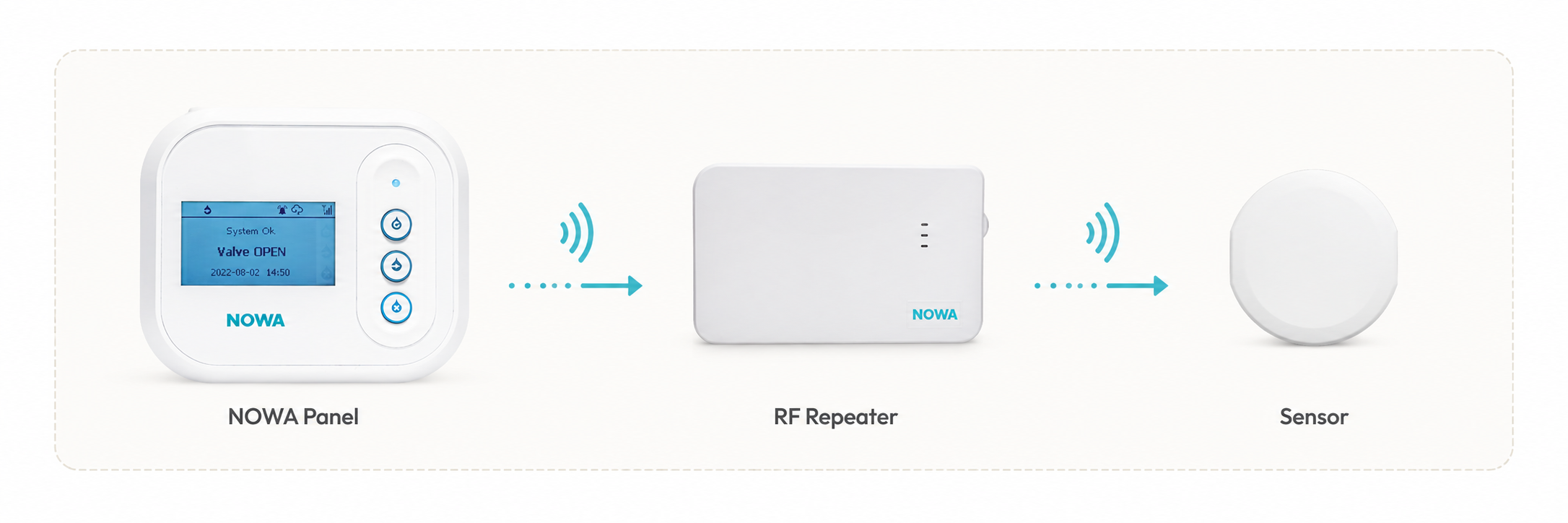
Example of a correct RF path: panel to repeater, then repeater to sensor.
Use a star pattern when multiple repeaters are required
When one repeater is not enough to cover all weak sensors, multiple repeaters can be installed around the panel using a star pattern.
In a star pattern, each repeater communicates directly with the NOWA panel. Sensors are then learned into the repeater that provides the best validated RF path for their final location.
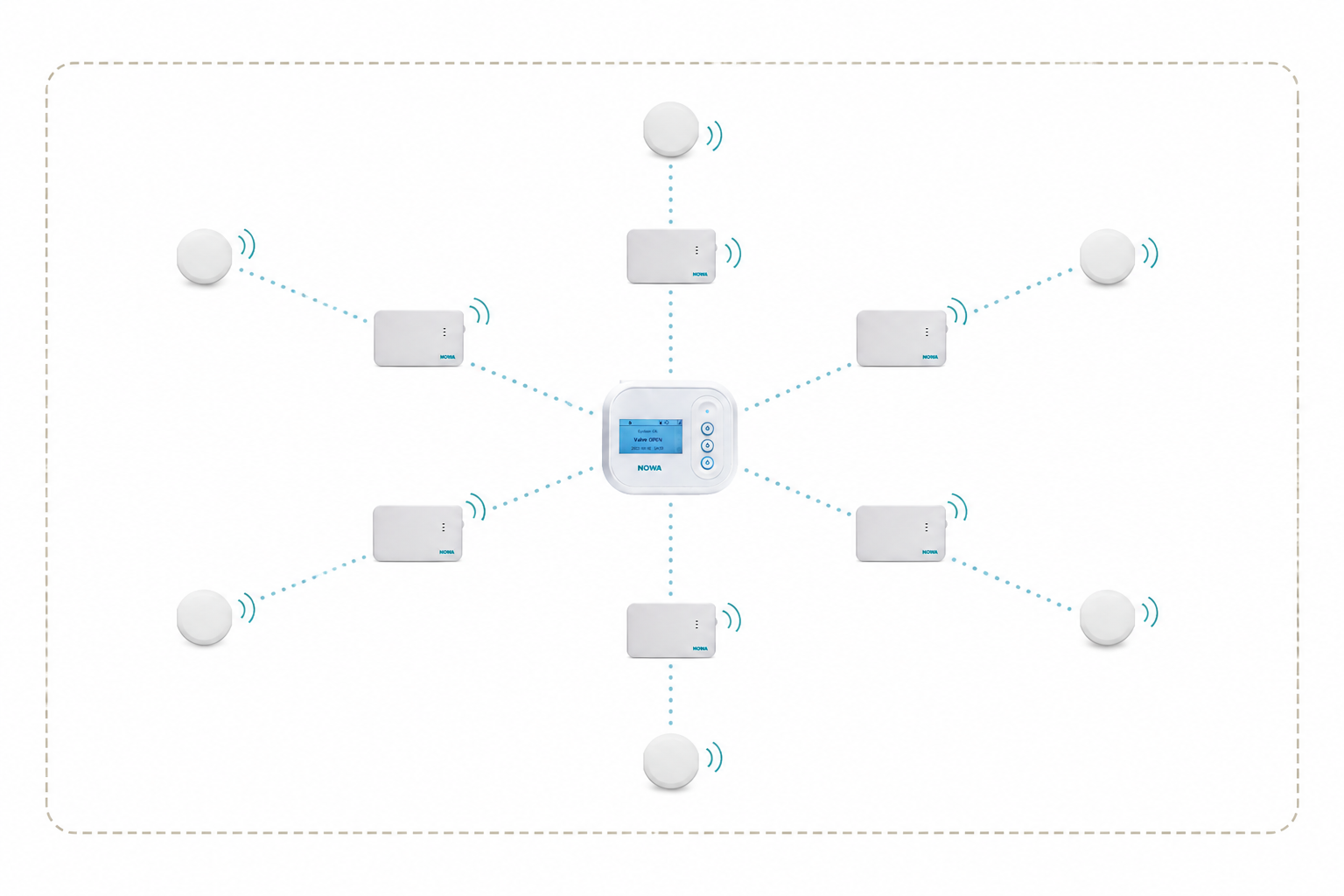
Example of a star pattern: the panel remains the center point, repeaters are positioned around it, and sensors are assigned to the appropriate repeater.
Correct star layout
- Each repeater has a direct RF path to the panel.
- Each sensor is learned into the repeater that best covers its location.
- Each repeater location is tested before mounting.
Avoid daisy chaining
- Do not use one repeater to reach another repeater.
- Do not assume that adding more repeaters automatically extends the total range.
- Do not mount repeaters before validating each RF path.
For most installations, learn a sensor into the closest validated repeater only. Avoid learning the same sensor into multiple repeaters unless instructed by NOWA Technical Support.
Choose the planned repeater location
The best repeater location is usually between the NOWA panel and the sensors with weak signal.
The repeater must be able to:
- Receive the signal from the sensors that need to be repeated.
- Transmit the repeated signal back to the NOWA panel.
Do not install the repeater:
- Inside a metal cabinet.
- Directly on a metal surface.
- Inside an electrical room, if it can be avoided.
- Inside a mechanical room, if it can be avoided.
- Behind large appliances or metal equipment.
- Too close to the panel.
Keep the repeater at least 5 feet away from the control panel.
Test the planned repeater location
Before installing the repeater, test the planned repeater location using a NOWA water leak sensor.
This test confirms whether the repeater location has a strong enough path back to the panel.
The repeater must be deactivated during this test. If the repeater is already powered, disconnect both the power supply and the backup battery before checking the signal strength. This prevents the repeater from affecting the signal value shown in the history.
- Place a NOWA water leak sensor at the exact location where the repeater is planned to be installed.
- Trigger a water detection with the sensor.
- Check the signal strength in the NOWA PRESENCE history.
- Repeat the test multiple times.
- Use the average signal strength to decide if the location is acceptable.
RF signal can be affected by small changes. Moving the sensor or repeater by approximately 1 foot, changing its orientation, or placing it on a different surface can change the signal strength. Test multiple times as close as possible to the final repeater position.
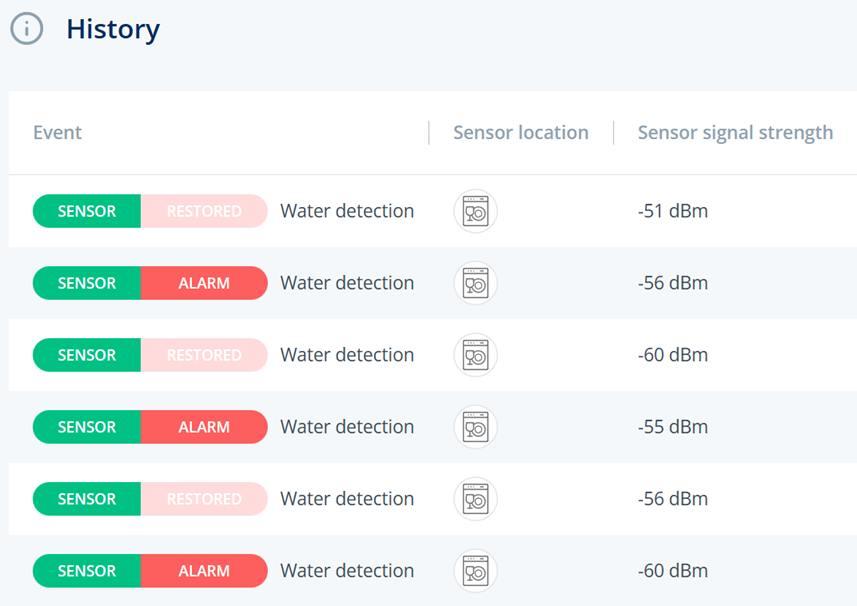
Use the history to validate the signal strength at the planned repeater location.
Interpret the signal strength
The planned repeater location should normally have a signal strength of approximately -85 dBm or higher.
A value closer to 0 is better. For example, -75 dBm is stronger than -85 dBm.
If the signal at the planned repeater location is lower than -85 dBm, the repeater may be too far from the panel. Move the repeater location closer to the panel and test again.
Power the RF repeater
- Open the repeater cover by pressing the side tab.
- Connect the internal backup battery connector.
- Connect the power supply to the repeater.
- Connect the power supply to a wall outlet that is not controlled by a switch.
Do not use a switched outlet. If the outlet is turned off, the repeater will eventually lose power and may stop repeating sensor signals.
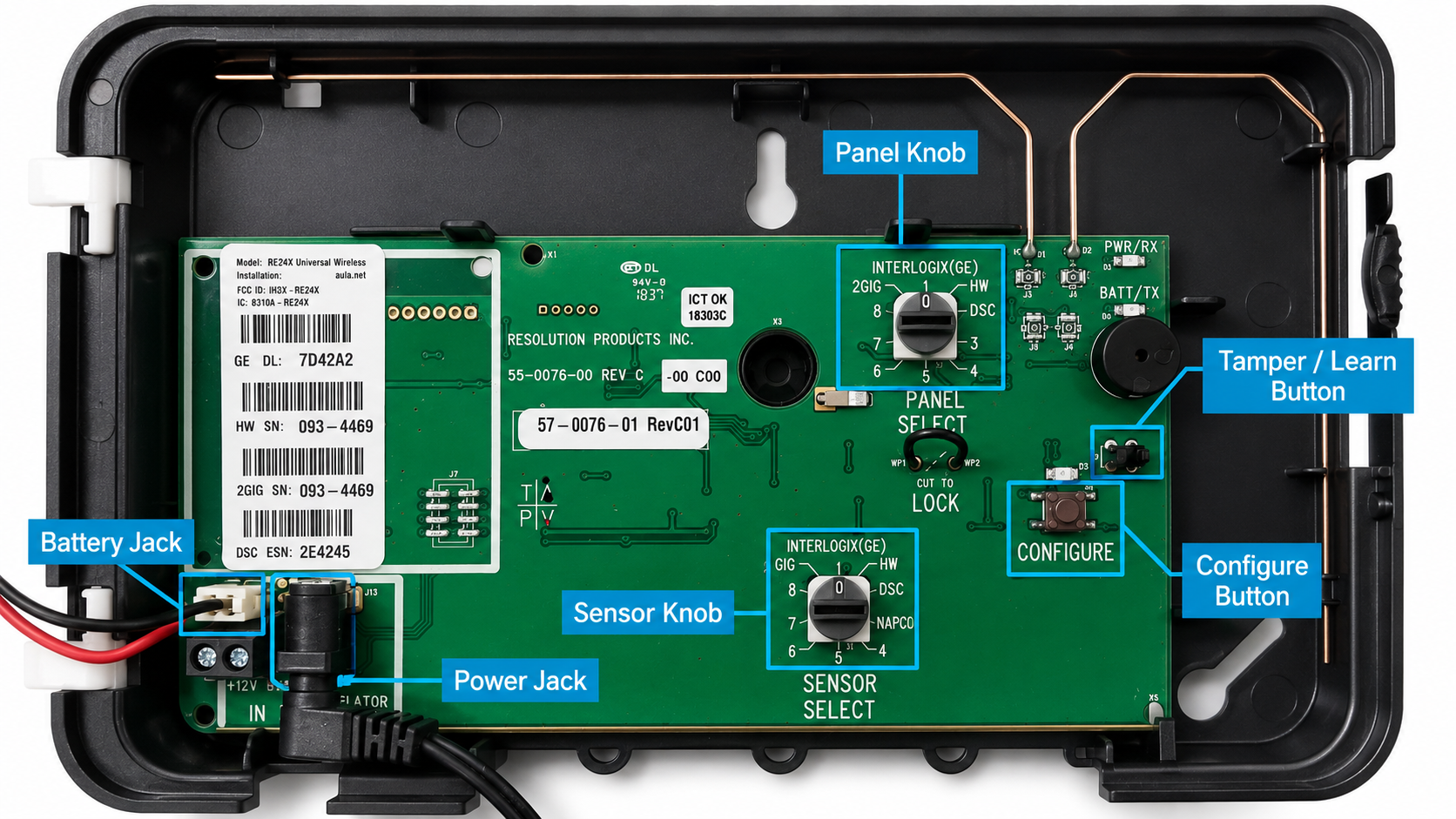
RF repeater internal components.
Set the RF protocol
Open the repeater cover and confirm that both selector knobs are set to Interlogix (GE).
When both selectors are set to the same protocol, the device works as a repeater.
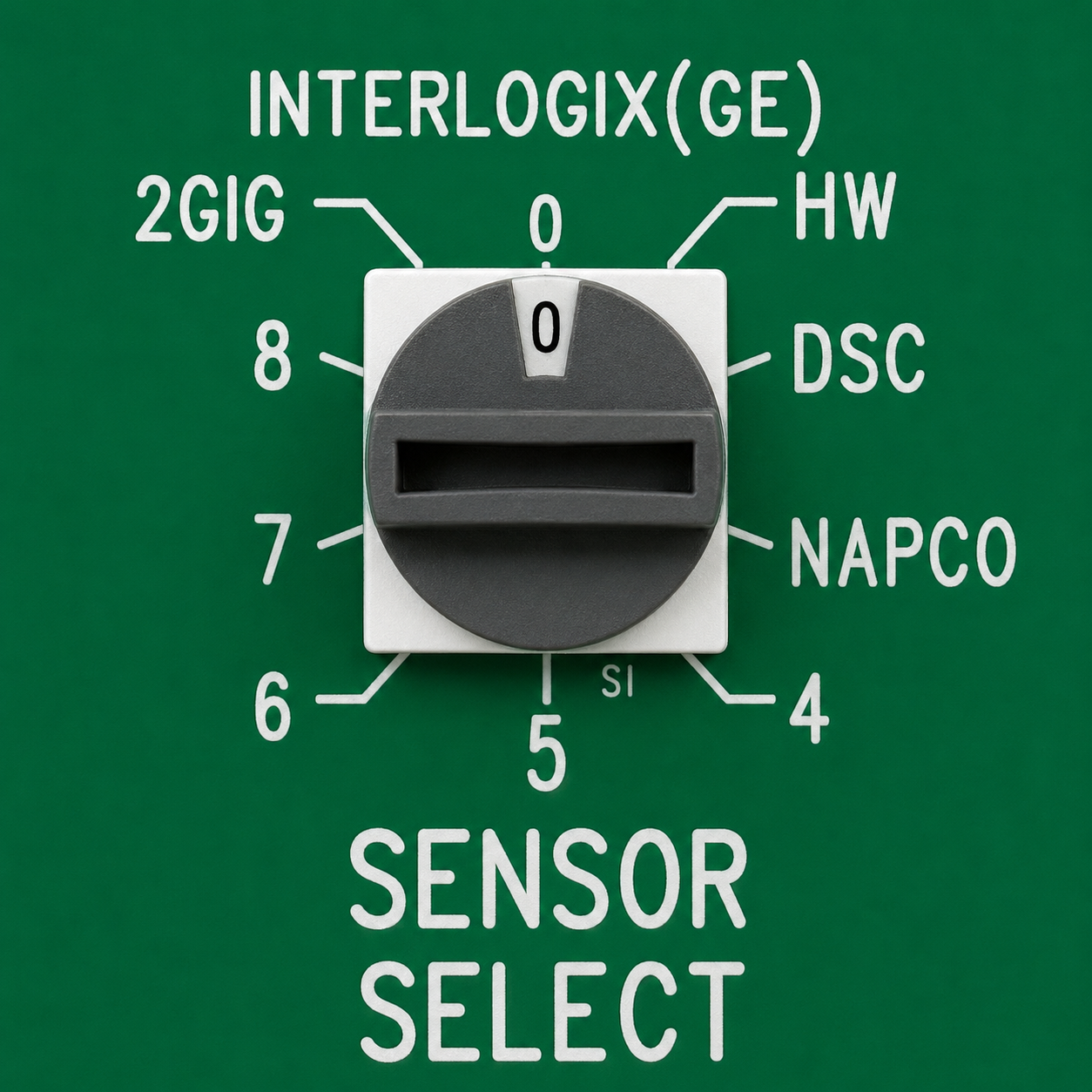
Panel selector
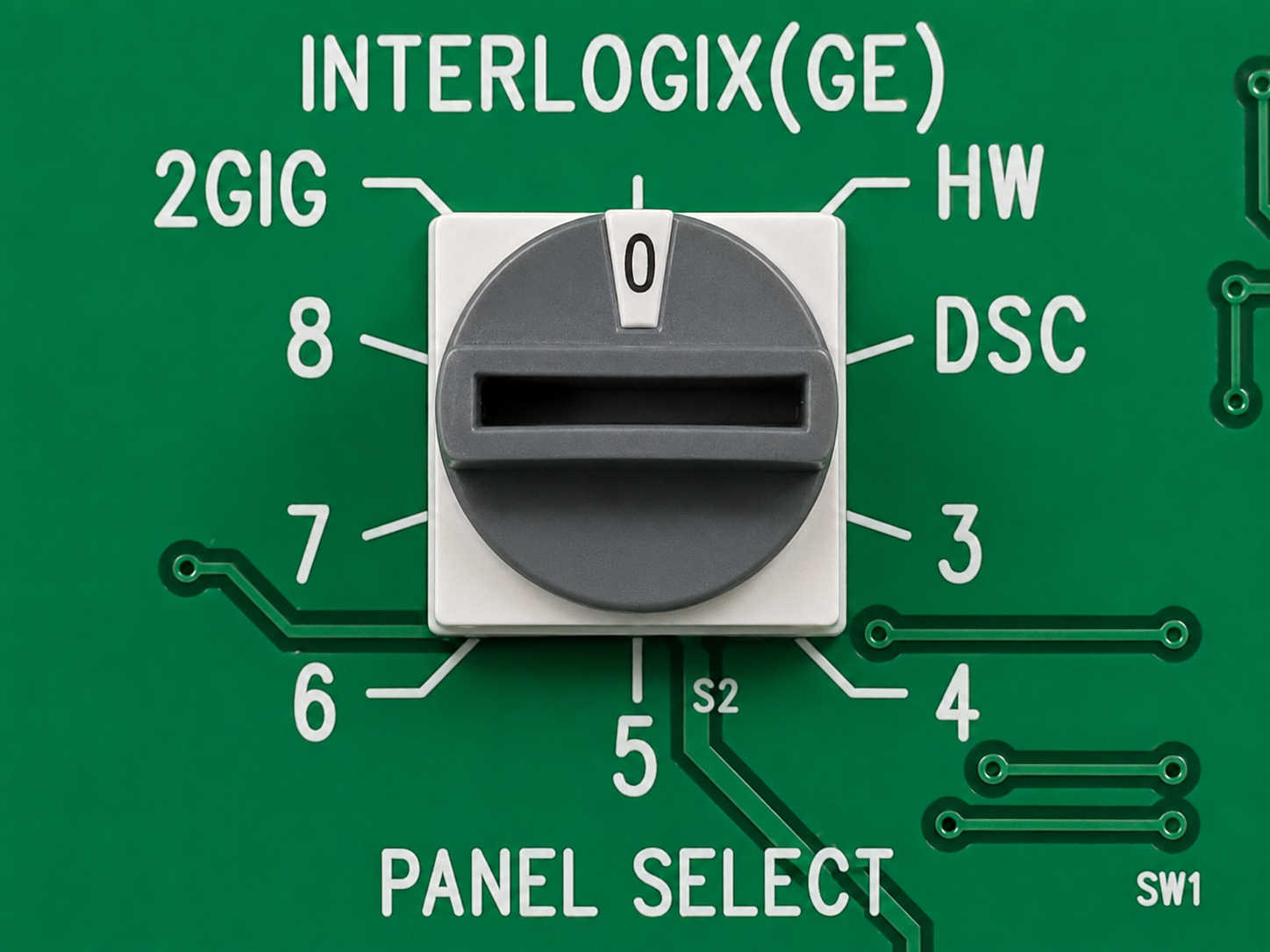
Sensor selector
Both selector knobs must be set to Interlogix (GE).
Add the RF repeater in NOWA PRESENCE
- Open the NOWA PRESENCE app or portal.
- Select the correct NOWA 4S or NOWA 4Se system.
- Go to the sensors section.
- Select the option to add a new sensor.
- Start learning mode.
- Close and open the repeater cover to trigger the repeater tamper.
- Wait for the serial number to be detected by the panel.
When the repeater is detected, configure it as follows:
Save or update the configuration.
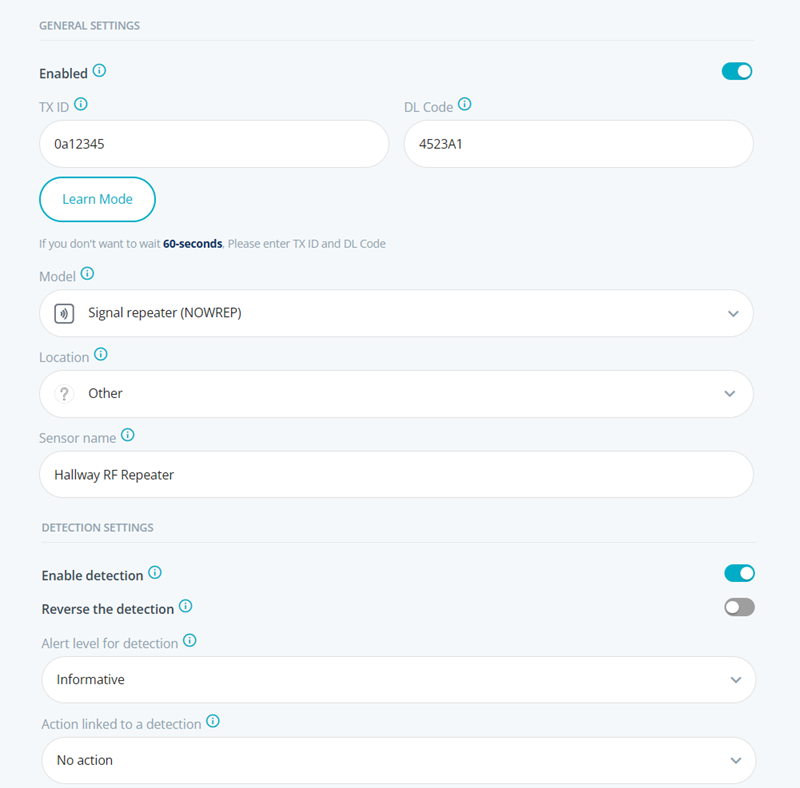
Add the repeater as Signal repeater (NOWREP).
Add sensors to the RF repeater
The repeater must learn the sensors that it needs to repeat.
Only add the sensors that require range extension. It is not necessary to add every sensor in the system.
Do not close the repeater cover while adding sensors in configuration mode. Closing the cover stops configuration mode. Keep the cover open until all sensors have been learned into the repeater.
- Open the repeater cover and keep it open.
- Press the CONFIGURE button once.
- Confirm that the yellow LED turns on. This confirms that the repeater is in configuration mode.
- Trigger a water detection on the sensor that needs to be repeated.
- Hold the detection for approximately 8 seconds or until the repeater beeps.
- Repeat the same steps for each sensor that must be repeated.
- When all sensors have been learned, press the CONFIGURE button again to exit configuration mode.
- Confirm that the yellow LED turns off.
- Close the repeater cover only after configuration mode has ended.
When adding a new sensor later, the previously learned sensors are retained. You do not need to relearn every sensor if you only need to add one sensor.
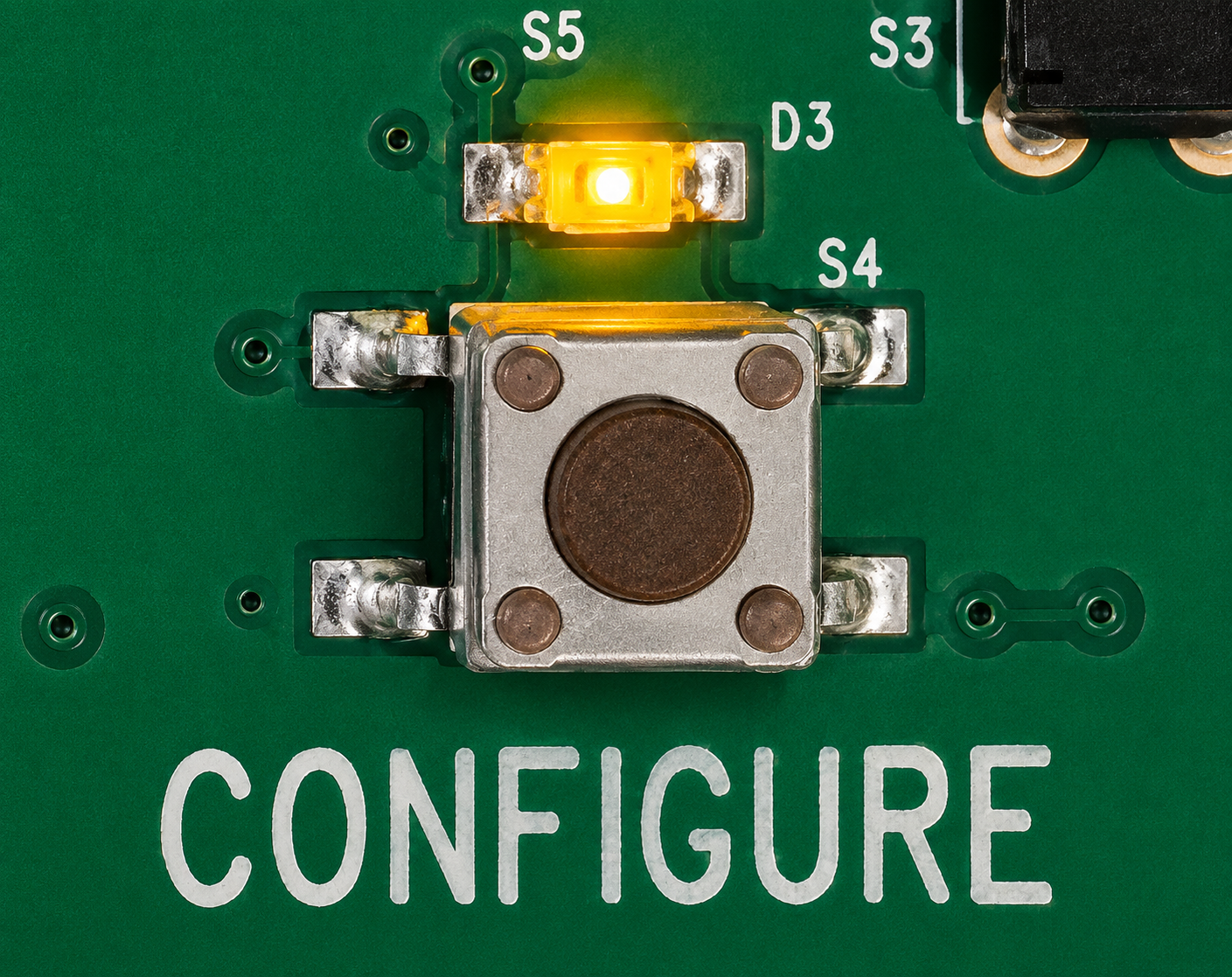
Press the CONFIGURE button to learn sensors into the repeater.
Validate the repeated sensors
After the repeater and sensors are configured, test each repeated sensor from its final installation location.
- Place the sensor in its final location.
- Trigger a water detection.
- Confirm that the repeater reacts.
- Confirm that the NOWA panel receives the alarm.
- Check the NOWA PRESENCE history.
- Repeat the test more than once.
During the test, the repeater LEDs can help confirm what is happening.
Do not validate the installation with the sensor beside the panel or beside the repeater unless that is the final sensor location.
If a sensor does not work through the repeater
If a sensor does not communicate properly after being added to the repeater, check the following points.
If configuration mode is not available
Configuration mode may be locked out after the repeater has been powered for more than 24 hours.
To re-enable configuration mode:
- Disconnect the repeater power supply.
- Disconnect the internal backup battery.
- Wait at least 5 seconds.
- Reconnect the backup battery.
- Reconnect the power supply.
- Open the repeater cover and keep it open.
- Press the CONFIGURE button again.
The yellow LED should turn on when the repeater enters configuration mode. Keep the cover open while adding sensors.
Factory reset the RF repeater
A factory reset removes the repeater configuration and should only be used when the repeater must be completely reconfigured.
Do not factory reset the repeater unless you are ready to configure it again.
- Open the repeater cover.
- Keep the repeater powered.
- Press and hold the CONFIGURE button.
- After a few seconds, the sounder will start beeping rapidly.
- Continue holding the button until the sounder stops beeping.
- Release the button.
- Configure the repeater again.
If the repeater has been locked, a factory reset may not be possible. Do not cut the lock wire unless instructed by NOWA Technical Support.
Complete the final test
- Confirm that the repeater is powered.
- Confirm that the backup battery is connected.
- Confirm that both selector knobs are set to Interlogix (GE).
- Confirm that the repeater is added in NOWA PRESENCE as Signal repeater (NOWREP).
- Confirm that each sensor requiring range extension has been learned into the repeater.
- Confirm that repeaters are installed in a star pattern, not in a daisy chain, when multiple repeaters are used.
- Trigger each repeated sensor from its final location.
- Confirm that the NOWA panel receives each alarm.
- Confirm that the signal is stable after multiple tests.
- Mount the repeater only after the final location has been validated.
Troubleshooting summary
Most common causes
- The repeater was installed too far from the panel.
- The repeater was installed too far from the sensors.
- The repeater was installed in a poor RF location.
- The signal was tested only once instead of multiple times.
- The repeater was mounted before testing the final location.
- The repeater was installed near metal, concrete, electrical equipment, or mechanical equipment.
- The sensor was not learned into the repeater.
- The repeater cover was closed while in configuration mode.
- The repeater was not added correctly in NOWA PRESENCE.
- The selector knobs were not set to Interlogix (GE).
- Repeaters were installed as a daisy chain instead of a star pattern.
Need assistance?
If the issue remains after completing the checks above, contact NOWA Technical Support.
Please provide the following information:
- Panel model: NOWA 4S or NOWA 4Se.
- Repeater serial number.
- Approximate distance between the panel and the repeater.
- Approximate distance between the repeater and the sensors.
- Signal strength measured at the planned repeater location.
- Signal strength measured after the repeater was installed.
- Number of sensors learned into the repeater.
- Number of repeaters installed, if multiple repeaters are used.
- Confirmation that the repeaters are installed in a star pattern, not in a daisy chain.
- Photos of the repeater location.
- Photos of the inside of the repeater showing the selector knobs.
- Exact message or behavior observed in NOWA PRESENCE.
Email: support@nowa4s.com
Phone: 1-877-287-7777
Online support: www.nowasupport.com
Was this article helpful?
That’s Great!
Thank you for your feedback
Sorry! We couldn't be helpful
Thank you for your feedback
Feedback sent
We appreciate your effort and will try to fix the article