How to troubleshoot a valve opening or closing problem
Use this procedure to determine whether the issue is caused by the valve movement, the valve power, the supervision wiring, the valve configuration, or the panel output.
A Problem valve opening or Problem valve closing message means that the system expected the valve to reach a specific position, but did not receive the expected confirmation.
This does not always mean that the valve motor is defective. In many cases, the valve is able to move, but the supervision circuit does not confirm the open or closed position.
The first step is to identify if the valve can physically move. If the valve moves correctly, the issue is usually related to the supervision wiring, the valve installation type, or the transition time.
Before you start
Make sure you have:
- Access to the NOWA PRESENCE app or portal.
- Access to the control panel.
- Access to the valve wiring terminals.
- A small flathead screwdriver.
- A multimeter, if voltage must be verified.
- Photos of the valve wiring before making any changes.
Do not leave valve supervision disabled after troubleshooting. Supervision should be enabled again once the issue is resolved so the system can confirm the valve position.
Understand the valve wiring
The valve wiring is divided into two parts: power and supervision.
NOWA 4S / 4Se – Main automatic shutoff valve
- White wire: terminal 1 / COM
- Green wire: terminal 2 / C1
- Yellow wire: terminal 3 / O1
- Red wire: terminal 13 / +
- Black wire: terminal 14 / -
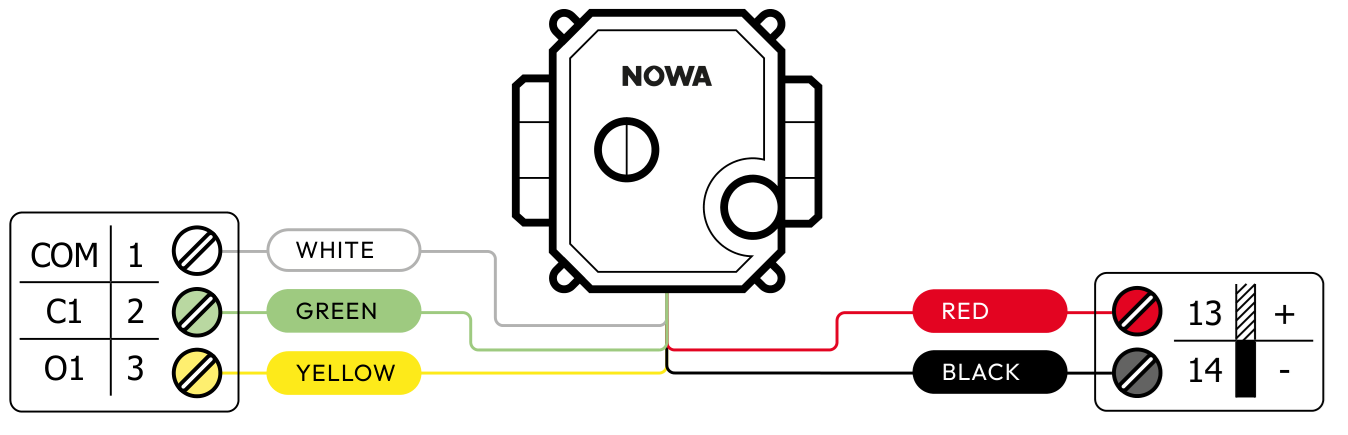
Main valve wiring diagram.
NOWA 4S – Auxiliary NOWA valve
For an auxiliary NOWA valve on a NOWA 4S panel, the supervision wires are connected to terminals 4, 5 and 6. The red and black power wires are connected to terminals 13 and 14.
- White wire: terminal 4 / COM
- Green wire: terminal 5 / C2
- Yellow wire: terminal 6 / O2
- Red wire: terminal 13 / +
- Black wire: terminal 14 / -
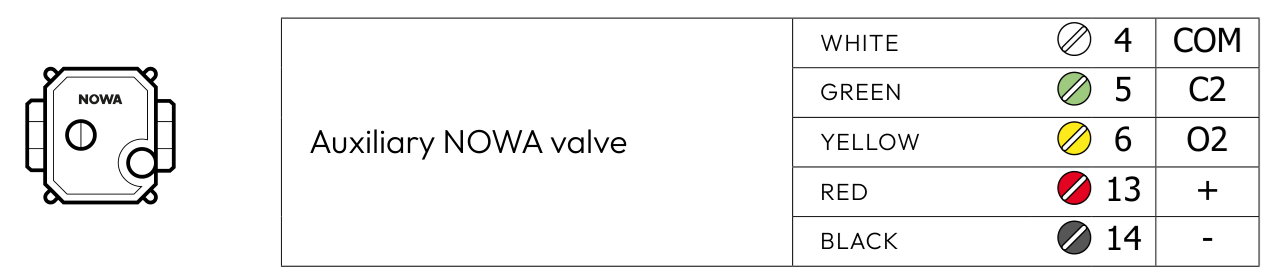
Auxiliary valve wiring diagram.
NOWA 4Se wiring note
On a NOWA 4Se, the red and black valve power wires are connected to terminals 13 and 14. The valve shares the power connection.
Check the valve settings
In the valve settings, confirm the following:
- The Valve installation type matches the installed valve: Normally Closed or Normally Open.
- Valve supervision is enabled during normal operation.
- The Valve mode matches the installation.
- The Valve transition time is long enough for the valve type and size.
Single valve mode
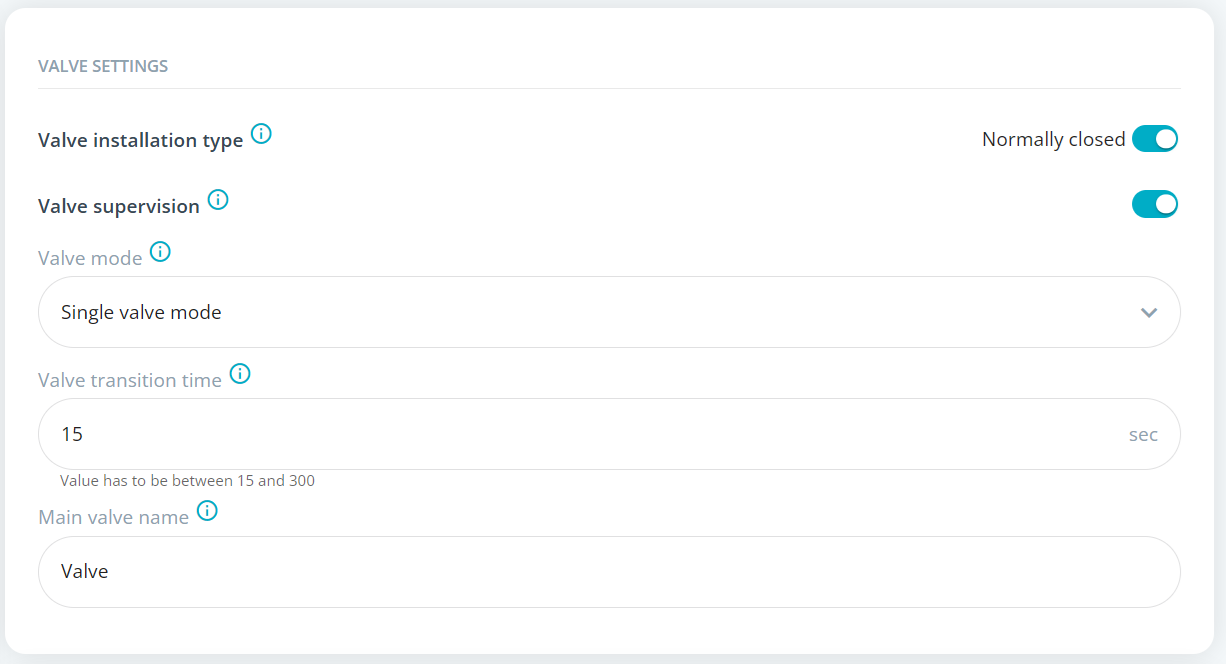
Valve settings in single valve mode.
NOWA 4S – Dual valve independent mode
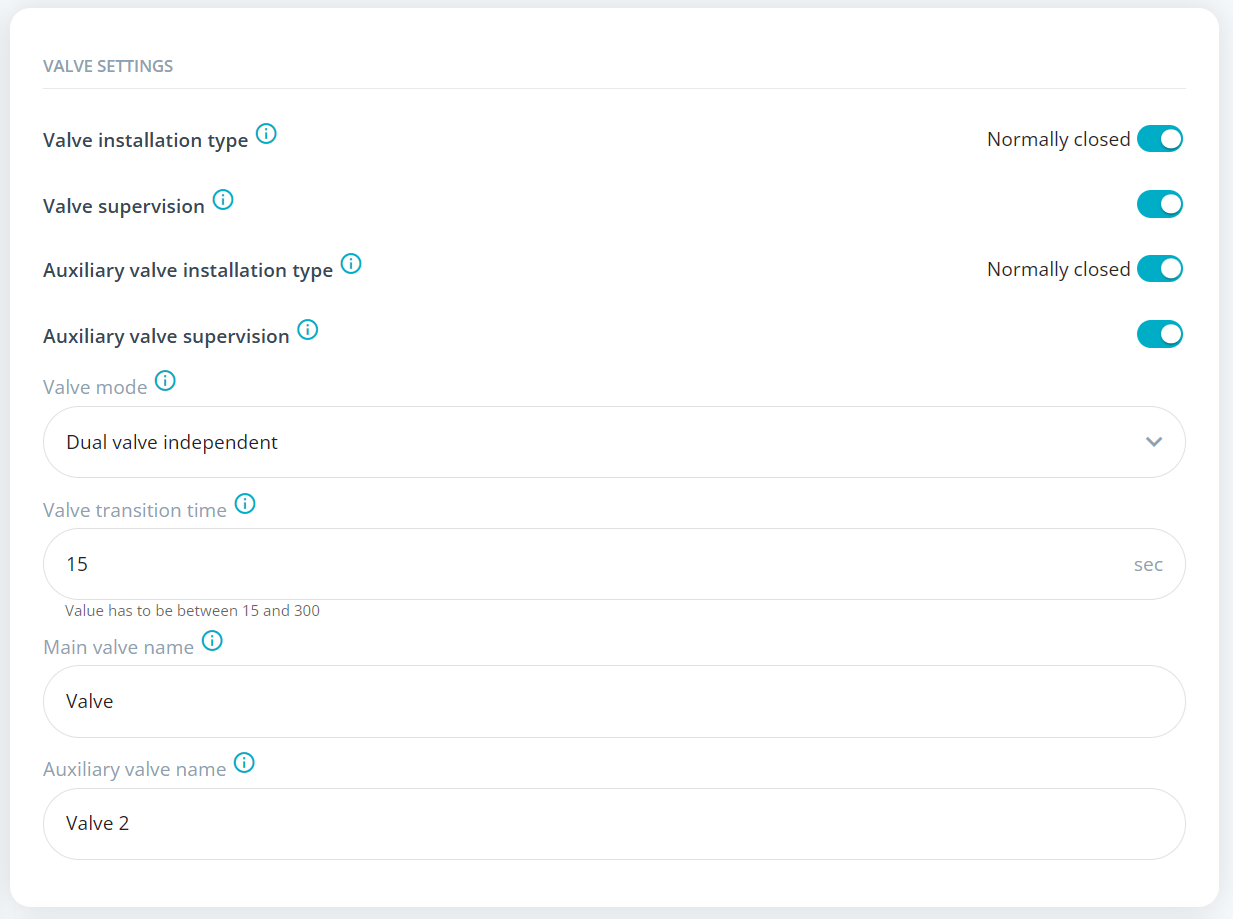
NOWA 4S valve settings in dual valve independent mode.
NOWA 4Se / 4S – Dual valve synchronized mode
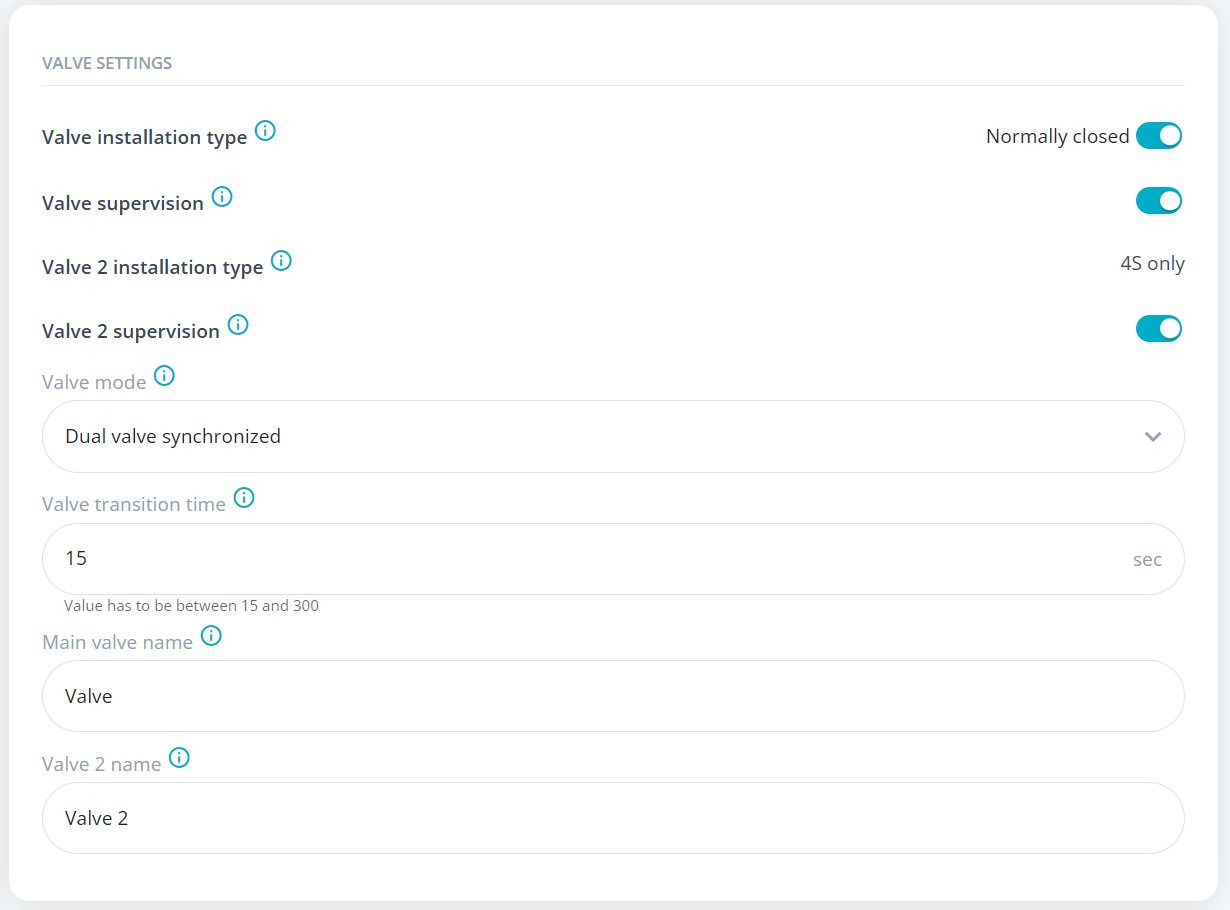
Valve settings in dual valve synchronized mode.
Force a valve rotation from the control panel
When a Problem valve opening or Problem valve closing is active, the NOWA 4S / 4Se panel can display an advanced menu that allows you to force a valve rotation cycle.
This option only appears when there is an active valve opening or valve closing problem. The panel will try to power the valve on and off based on the configured valve transition time.
- Go to the control panel.
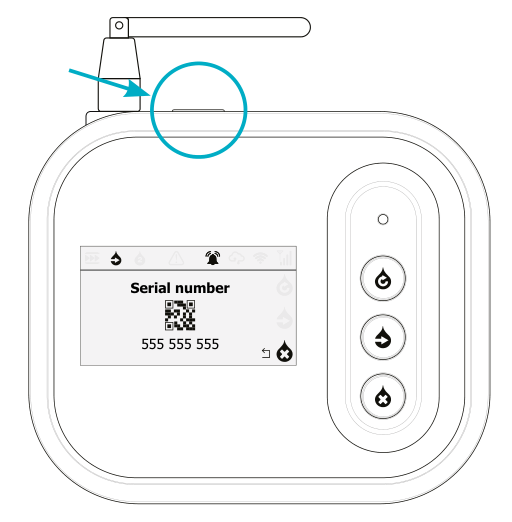
Menu button location on top of the NOWA 4S / 4Se control panel.
- Press and hold the menu button on top of the control panel.
- Wait until the Perform valves reinitialization menu appears.
- Press the menu button once to reach the Perform the action menu.
- Press the middle button to start the reset valve cycle.
- The panel will ask for confirmation because the system is in alarm.
- Select Yes to confirm.
- The panel will try to power the valve on and off to force a full valve rotation cycle.
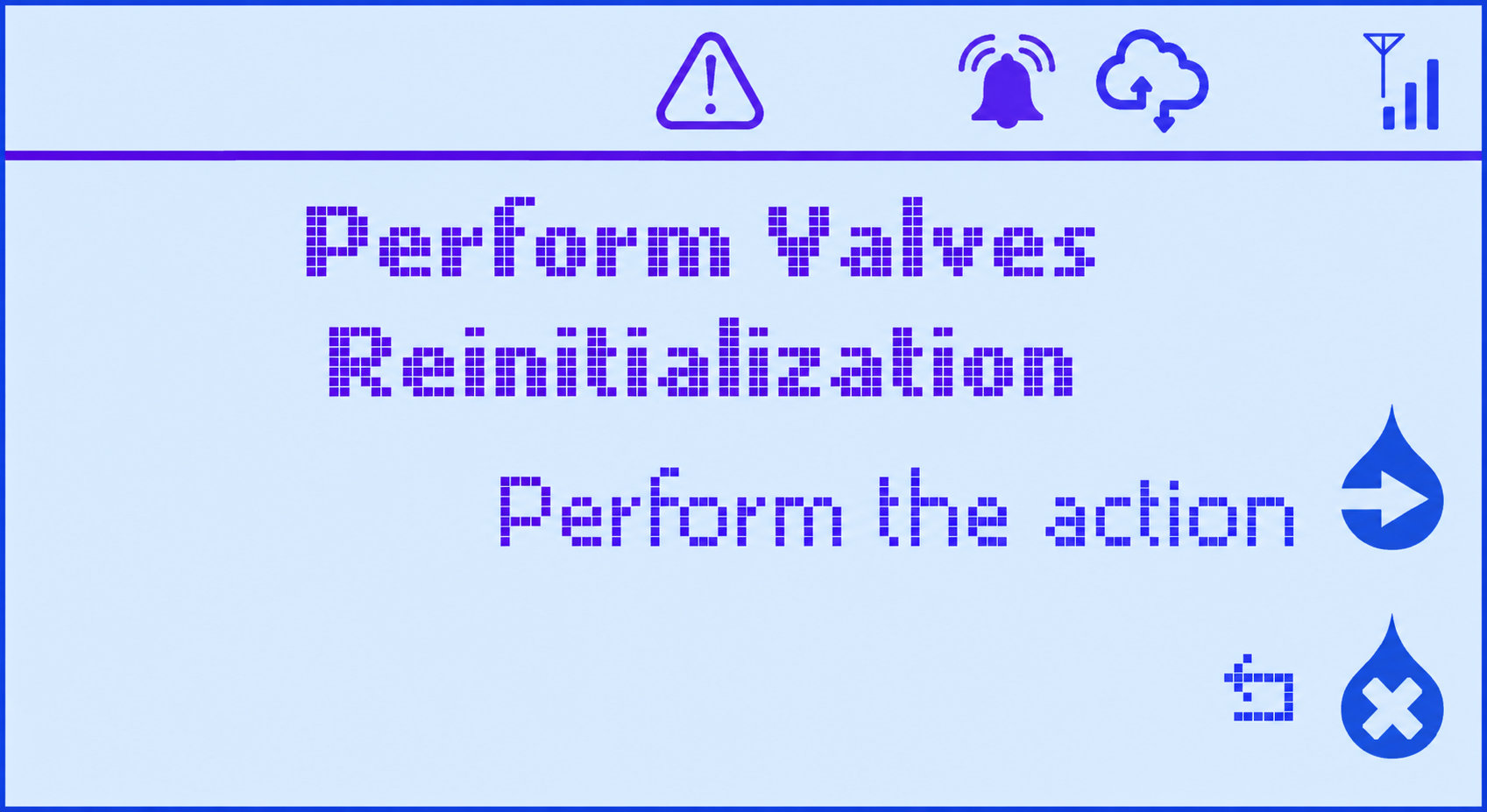
Perform valves reinitialization menu.
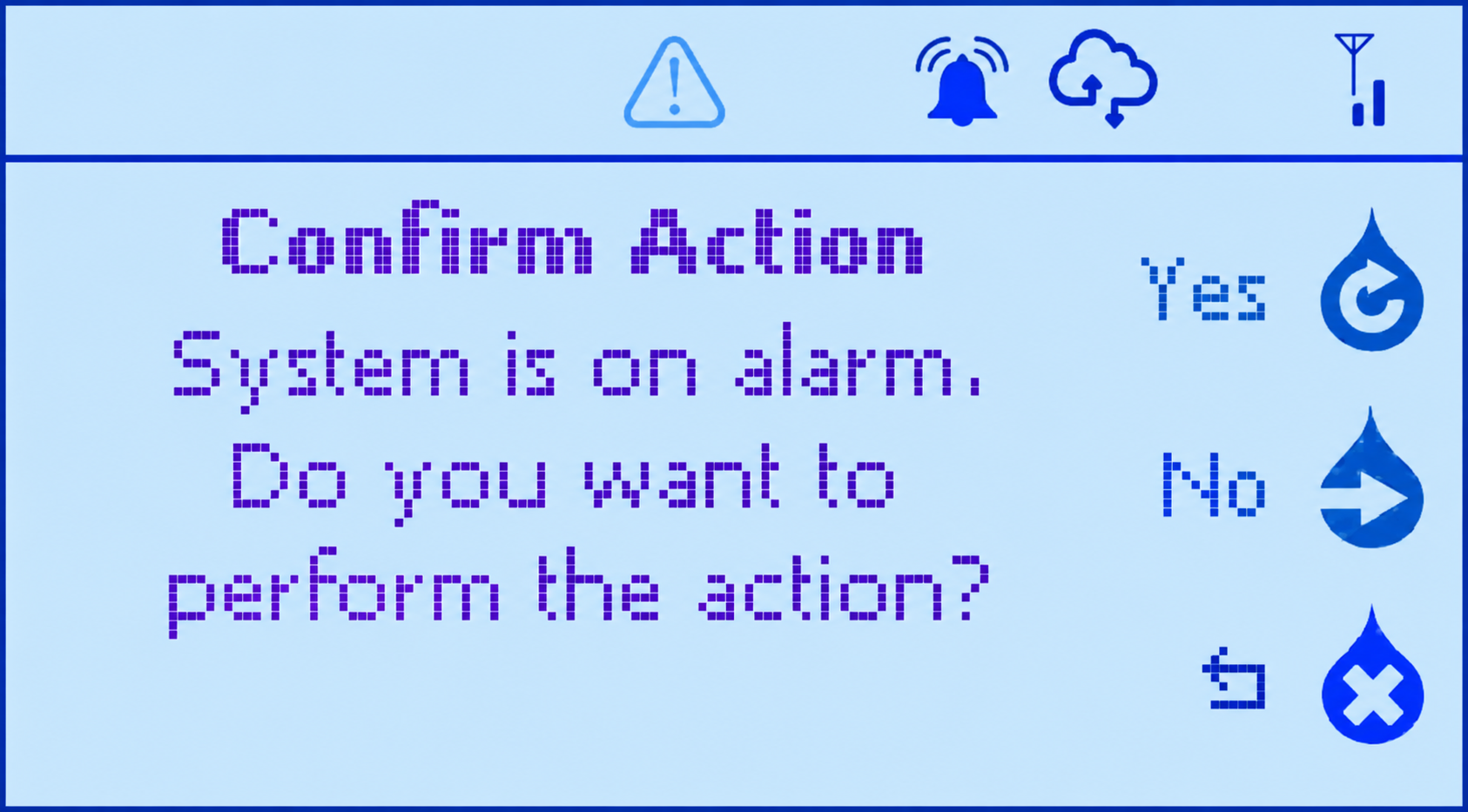
Confirmation screen shown while the system is in alarm.
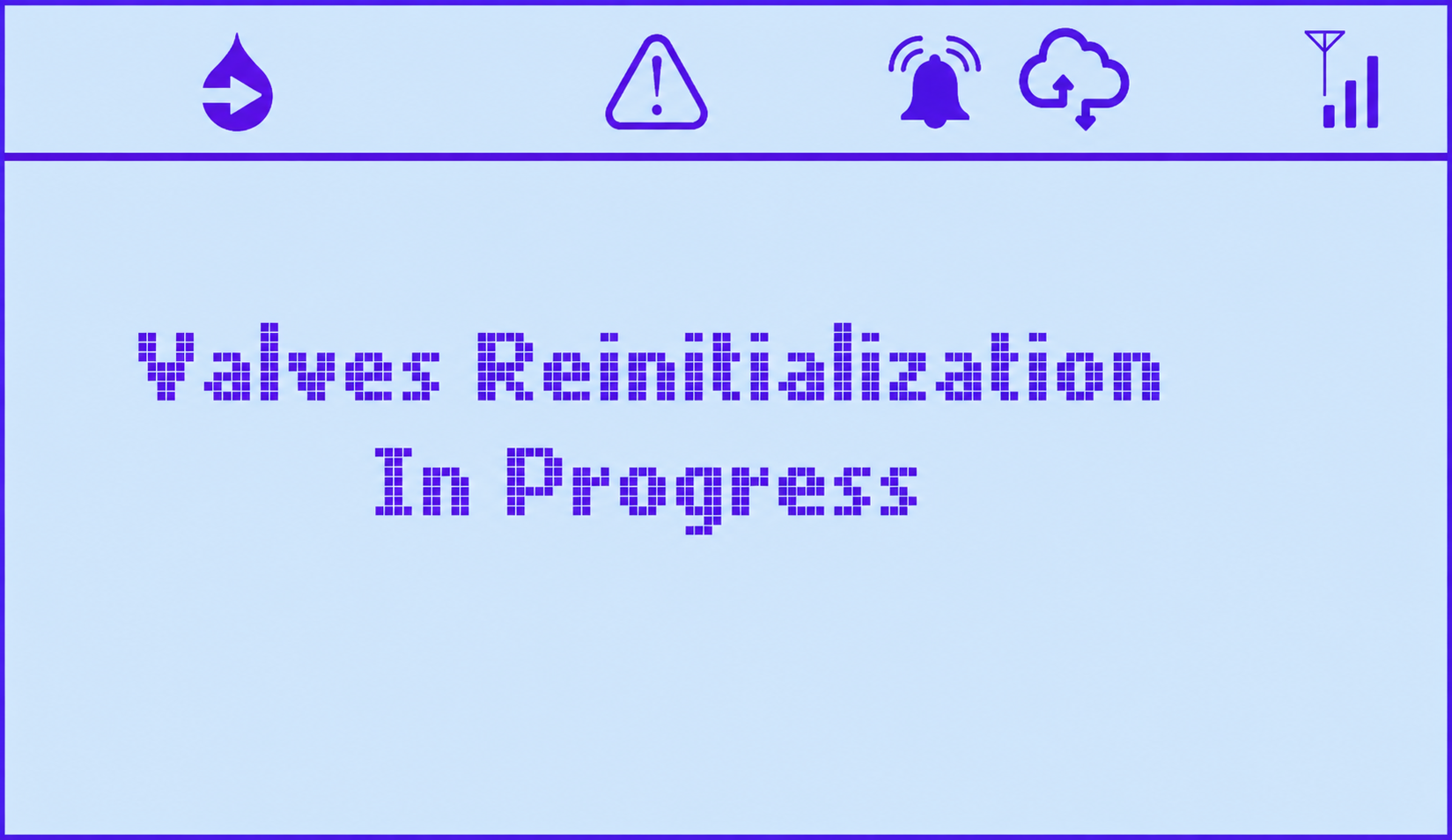
Valve reinitialization in progress.
Observe the valve directly during the reset valve cycle and confirm whether it physically moves.
Confirm whether the valve can move
If the valve problem remains active and you cannot control the valve normally, temporarily disable supervision to test whether the valve motor can physically move.
- Go to the valve settings.
- Temporarily disable Valve supervision for the affected valve.
- Cancel the valve alarm or trouble.
- Send an open or close command to the valve.
- Observe the valve directly.
If the valve does not move
The issue is likely related to power, wiring, manual override, cable extension, or the valve mechanism.
Continue to section 5.
If the valve moves
The issue is likely related to the supervision wiring, valve installation type, or transition time.
Continue to section 6.
If the valve does not move
Check the power wires
Confirm that the red and black wires are connected to the correct power terminals.
- The wires must be inserted into the correct terminals.
- The terminal screws must be tight.
- The screw must press on the metal conductor, not on the plastic insulation.
- The wire must not be loose or partially inserted.
If the terminal screw is tightened on the plastic insulation instead of the exposed metal conductor, the valve may not receive power or the supervision signal may not be detected correctly.
Check the voltage delivered to the valve
The power delivered to the valve depends on the power source used to power the panel. The valve output voltage follows the panel power supply voltage.
The NOWA 4S / 4Se panel can accept a power supply between 10 and 30 VDC. When troubleshooting a valve that does not move, verify the voltage at the valve power terminals and compare it with the power source used for the panel.
Check if the valve needs to be powered longer
If a valve has not moved for a long period of time, it may need to be powered longer to start moving again.
- If the valve is configured as Normally Open, send a close command to power the valve.
- If the valve is configured as Normally Closed, send an open command to power the valve.
Check the manual override
If the manual override is active, the motor may not be able to control the valve properly. Return the valve to its normal motorized operating position, then test again.
Check the cable extension
If the original valve cable was extended, inspect the extension carefully.
- Wires touching each other.
- Poor splices or loose connectors.
- Cable damaged by staples.
- Cable pinched, crushed or cut.
- Wrong wire-to-wire connection.
- Moisture inside junction points.
If the valve moves but the problem returns
If the valve physically opens and closes when supervision is disabled, the motor and power wiring are likely functional. Re-enable valve supervision and identify which confirmation is missing.
- Enable Valve supervision again.
- Send a close command and check if the closing confirmation is detected.
- Send an open command and check if the opening confirmation is detected.
- Note which confirmation fails: opening, closing, or both.
If both opening and closing do not confirm
If both the opening and closing confirmations fail, the most likely issue is with the white COM supervision wire or its terminal connection.
- Confirm that the white wire is connected to the correct COM terminal.
- Confirm that the white wire is properly stripped.
- Confirm that the terminal screw is tightened on the metal conductor, not on the plastic insulation.
- Check for a loose wire or broken conductor.
- Check for a damaged cable extension.
If only opening or only closing does not confirm
If only one position does not confirm, the issue is usually related to the green or yellow supervision wire. The affected wire depends on whether the valve is configured as Normally Closed or Normally Open.
Confirm that the configured valve installation type matches the actual valve installed. A Normally Open valve configured as Normally Closed, or a Normally Closed valve configured as Normally Open, can cause incorrect confirmation behavior.
Optional advanced test: swap the valve from Main to Auxiliary
If the valve moves but the problem keeps returning, an advanced test can be performed by temporarily moving the valve wiring from the Main valve terminals to the Auxiliary valve terminals.
This test should only be performed by someone comfortable with the valve wiring and panel configuration. Before moving any wires, take clear photos of the original wiring so it can be restored correctly.
Purpose of this test
This test helps determine whether the problem follows the valve wiring or stays with the panel output.
- If the problem moves from the Main valve to the Auxiliary valve, the issue is more likely related to the valve wiring, supervision wiring, cable extension, or valve itself.
- If the problem does not move to the auxiliary output, the issue may be related to the main valve relay/output on the panel, or the wiring may have been reconnected more securely during the test.
Procedure
- Take clear photos of the current Main valve wiring.
- Move the valve wiring from the Main valve terminals to the Auxiliary valve terminals.
- Adjust the valve supervision settings in the panel to match the new temporary auxiliary valve configuration.
- Test the valve again by sending an open command and a close command.
- Check if the valve problem now appears on the auxiliary valve instead of the main valve.
Interpret the result
Confirm by switching back
After testing the valve on the auxiliary output, move the wiring back to the original Main valve terminals and adjust the valve supervision settings back to the original configuration.
- If the problem returns to the Main valve, the issue is likely related to the main valve output or relay.
- If the problem does not return, the original issue may have been caused by a loose wire, poor terminal contact, or a wiring connection that was corrected during the test.
Adjust the valve transition time
The valve transition time is the maximum time allowed for the valve to reach the expected position. If the transition time is too short, the panel may report a valve problem even if the valve is working normally.
After adjusting the transition time, test the valve again by sending an open command and a close command.
Complete the final test
- Cancel any active alarm or trouble.
- Enable valve supervision.
- Send a close command to the valve.
- Confirm that the valve physically closes.
- Confirm that the panel does not show Problem valve closing.
- Send an open command to the valve.
- Confirm that the valve physically opens.
- Confirm that the panel does not show Problem valve opening.
Troubleshooting summary
Most common causes
- Screw tightened on the plastic insulation instead of the metal conductor.
- Wrong terminal used.
- Supervision wire connected incorrectly.
- Not enough power reaching the valve.
- Valve transition time too short.
- Manual override active.
- Cable extension issue.
- Wires touching each other.
- Cable damaged, stapled, pinched or cut.
- Valve installation type configured incorrectly.
- Possible panel relay/output issue.
Need assistance?
If the issue remains after completing the checks above, contact NOWA Technical Support.
Please provide the following information:
- Panel model: NOWA 4S or NOWA 4Se.
- Valve size and type.
- Whether the valve is configured as Normally Closed or Normally Open.
- Current valve transition time.
- Whether the valve physically moves when supervision is disabled.
- Whether the problem is on opening, closing, or both.
- Photos of the valve wiring terminals.
- Photos of any cable extensions or junctions.
- Exact message displayed by the panel or portal.
Email: support@nowa4s.com
Phone: 1-877-287-7777
Online support: www.nowasupport.com
Was this article helpful?
That’s Great!
Thank you for your feedback
Sorry! We couldn't be helpful
Thank you for your feedback
Feedback sent
We appreciate your effort and will try to fix the article